December 29, 2025
It’s Time for the December Completed Album Challenge PLUS a Winter Bliss Layout for Your Frosty Photos

Finished an album this month? Now’s the perfect time to head over to the Virtual Crop Group and show it off during the December Completed Album Challenge! If you need inspiration to get those last few pages done, check out this sweet layout to preserve your favorite memories!
Once you have completed your album (it does not need to be from start to finish in December, just completed in December), make a short video flipping through each of the pages in your newly completed album to share. Then, post your video in the Virtual Crop Group with the hashtag #CompletedDecember2025 by Jan. 4 at 11:59pm CT (AU: 5 Jan. at 4:59pm AEDT) for the chance to win!
For ALL the details on the Completed Album Challenge, check out this blog post.

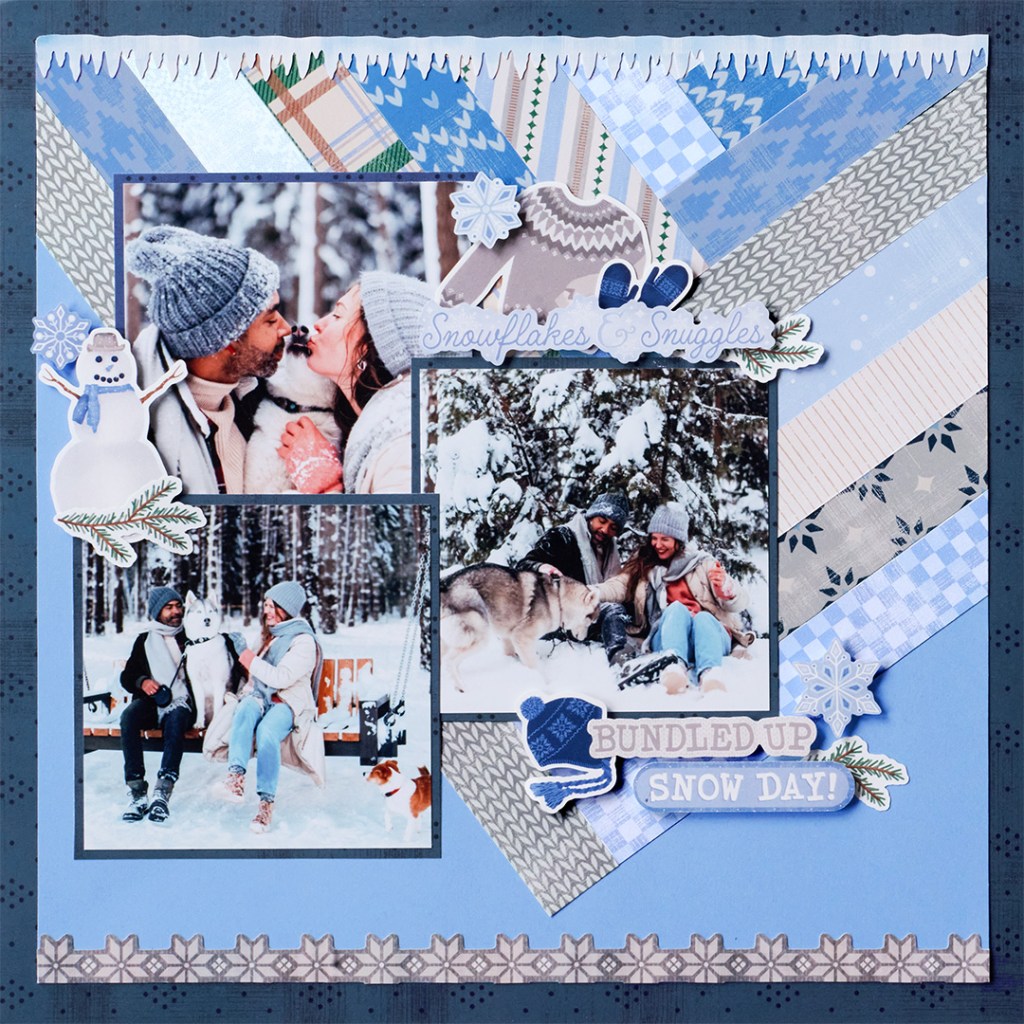
To create this layout, you will need:
- Winter Bliss Paper Pack (Shop Canada | Shop Australia)
- Winter Bliss Stickers (Shop Canada | Shop Australia)
- Songbird Blue Solid Cardstock (Shop Canada | Shop Australia)
- 12-inch Trimmer (Shop Canada | Shop Australia)
- Micro-Tip Scissors (Shop Canada | Shop Australia)
- Repositionable Tape Runner (Shop Canada | Shop Australia)
- Foam Squares Variety Pack (Shop Canada | Shop Australia)
- Zero Centering Ruler (Shop Canada | Shop Australia)

Step 1: Use the navy designer paper as the base for the layout. Cut out the inside, leaving a 1-1/4″ frame. Set the inside piece aside to use as photo mats.
Step 2: Cut a piece of Songbird Blue Solid Cardstock to measure 11″ x 11″.
Step 3: Cut a variety of designer paper strips that measure 1″ x 12″. Adhere one strip to the upper left side of the cardstock, so the bottom point is about 6″ in and 1″ from the bottom edge.
Step 4: Place another strip so that the short 1″ end aligns with the edge of the previous strip to create a “V” shape. Continue alternating back and forth, adhering the strips until the “V” is filled. Trim any excess with scissors.
Step 5: Adhere the icicle border sticker along the top edge of the cardstock, trimming any excess.
Step 6: Adhere the gray snowflake border sticker along the bottom edge, trimming off any excess.
Step 7: Adhere the entire cardstock piece to the center of the navy designer paper frame.
Step 8: From the navy piece set aside earlier, cut three photo mats measuring 4-1/4″ x 4-1/4″. Mount photos sized 4″ x 4″ onto each mat, then adhere them to the layout.
Step 9: Add stickers to the layout, using Foam Squares on some for added dimension.
Step 10: Journal as desired.
P.S. Are YOU a member of the Virtual Crop Group? It’s your go-to place for MONTHLY Virtual Crops, MONTHLY Completed Album Challenges, QUARTERLY Secret Box Openings with project tutorials and so much more! We hope you’ll join our community of more than 49,000 fellow memory-keeping enthusiasts — you’ll feel right at home!


Love these papers and your layout! Thanks for the inspiration Melissa!