April 3, 2026
February Virtual Crop’s Full Size to Fun Size Sketches are Here!
As more scrapbookers fall in love with Creative Memories’ Scrap Journal, adapting 12″ x 12″ Virtual Crop sketches to fit 6.75″ x 10″ pages becomes a fun creative challenge! The most important thing to keep in mind is that every element is simply on a smaller scale, but you are not limited to sticking to the sketch exactly!
Because you’re converting from a square page to a rectangle, proportionally shrinking everything doesn’t always work. While you can calculate ratios, that approach doesn’t necessarily create the most balanced result. Instead, focus on preserving the integrity of the sketch while adjusting elements in a way that feels natural on a slimmer page.
That also means not every element needs to make the transition. There simply isn’t as much real estate on a 6.75″ x 10″ page, and that’s perfectly fine! We hope you use this blog post as a way to inspire you to create something that fits in your Scrap Journal, and hopefully you have fun doing it!
Photo Sizing Tips for Scrap Journal Pages
When resizing layouts, photo sizes often shift, too. Instead of your standard sizes, consider downsizing slightly to accommodate more photos on your page.
- 3″ x 4″ or 4″ x 3″
- 2″ x 3″ of 3″ x 2″
- 3″ x 3″
- 2″ x 2″
These sizes are easy to print at home or with your favorite photo processor by creating collages with various apps or creative websites such as Canva. For more tips on printing at a smaller scale, check out this video! That said, larger prints still work beautifully as focal points. A 4″ x 6″ or even a 5″ x 7″ photo can anchor a Scrap Journal page when you want one standout image.
Layout Inspiration

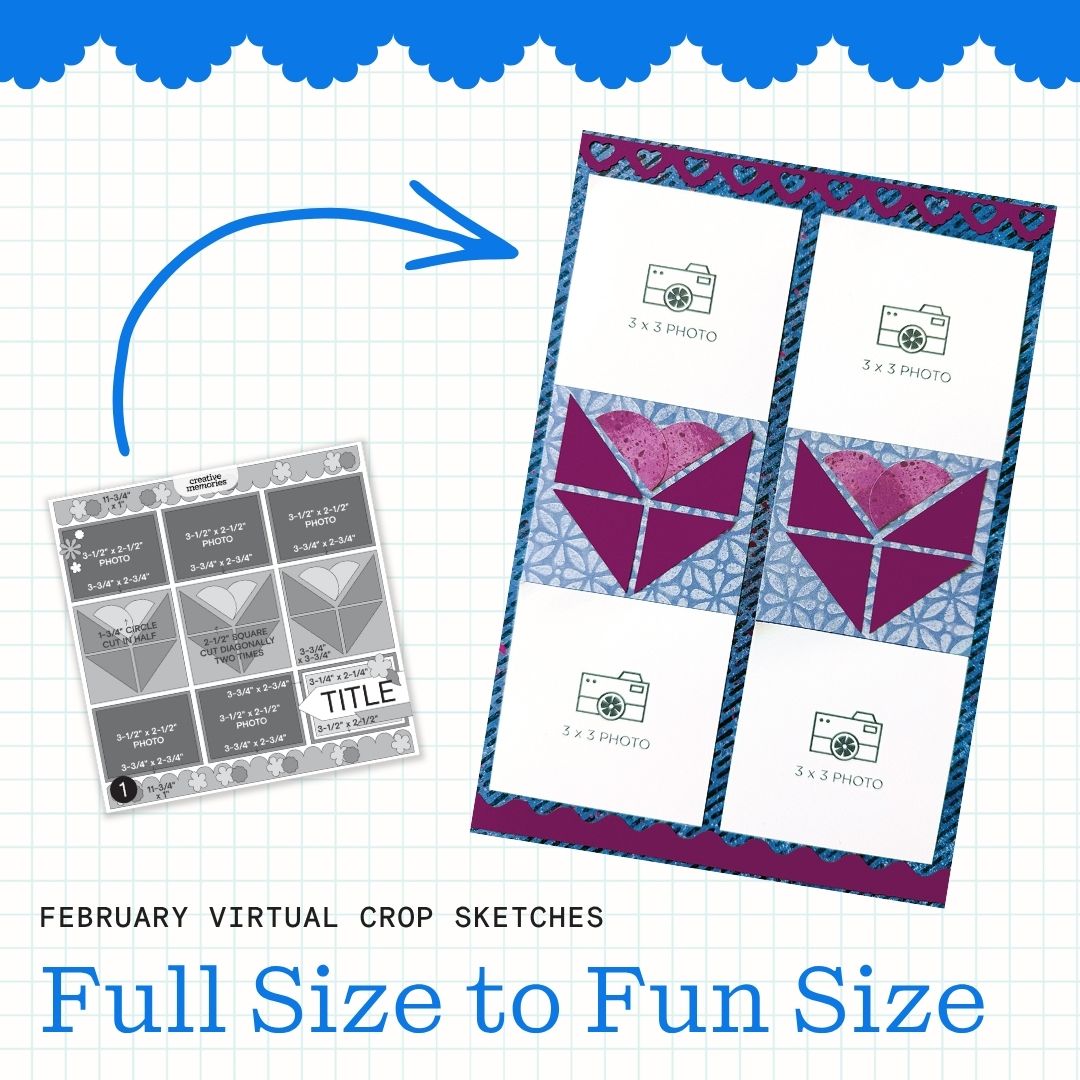
This layout stays very close to the original 12″ x 12″ sketch, with just one key adjustment. When converting to the 6.75″ x 10″ format, remove the third column of photos to create a more comfortable fit. From there, simply scale the remaining elements down slightly.
If additional storytelling space is needed, consider swapping one of the photos for a title or journaling box. This is a versatile design that works well across many themes and can easily be repeated on a second page to create a cohesive two-page spread.
Photo sizes: Four 3″ x 3″
Sketch by Emily G., Creative Memories Design Team Contributor
Layout by Debbie P., Creative Memories Design Team Contributor

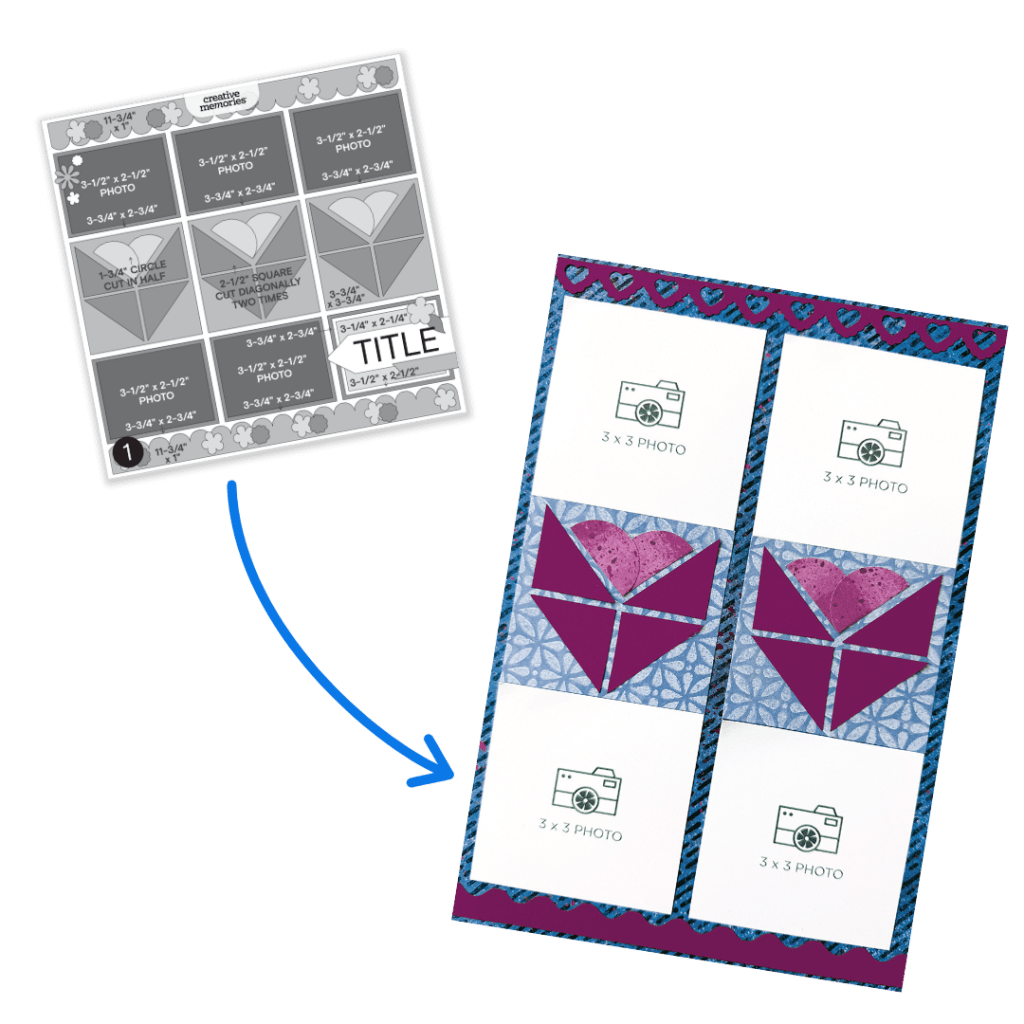
This sketch adapts beautifully when spread across two Scrap Journal pages. To create a cohesive look, position the main design elements closer to the center of each page so the layout feels connected across the spread. To add interest without adding bulk, use a decorative blade on the 12-inch Trimmer along the patterned paper strips on the outer edges. This adds texture while keeping the design light and balanced.
Keeping everything slightly smaller — papers, photos and even some design elements — helps maintain the integrity of the sketch while making it feel natural in the Scrap Journal format.
Photo sizes: Four 3-1/2″ x 3-1/2″
Sketch by Emily G., Creative Memories Design Team Contributor
Layout by Debbie P., Creative Memories Design Team Contributor

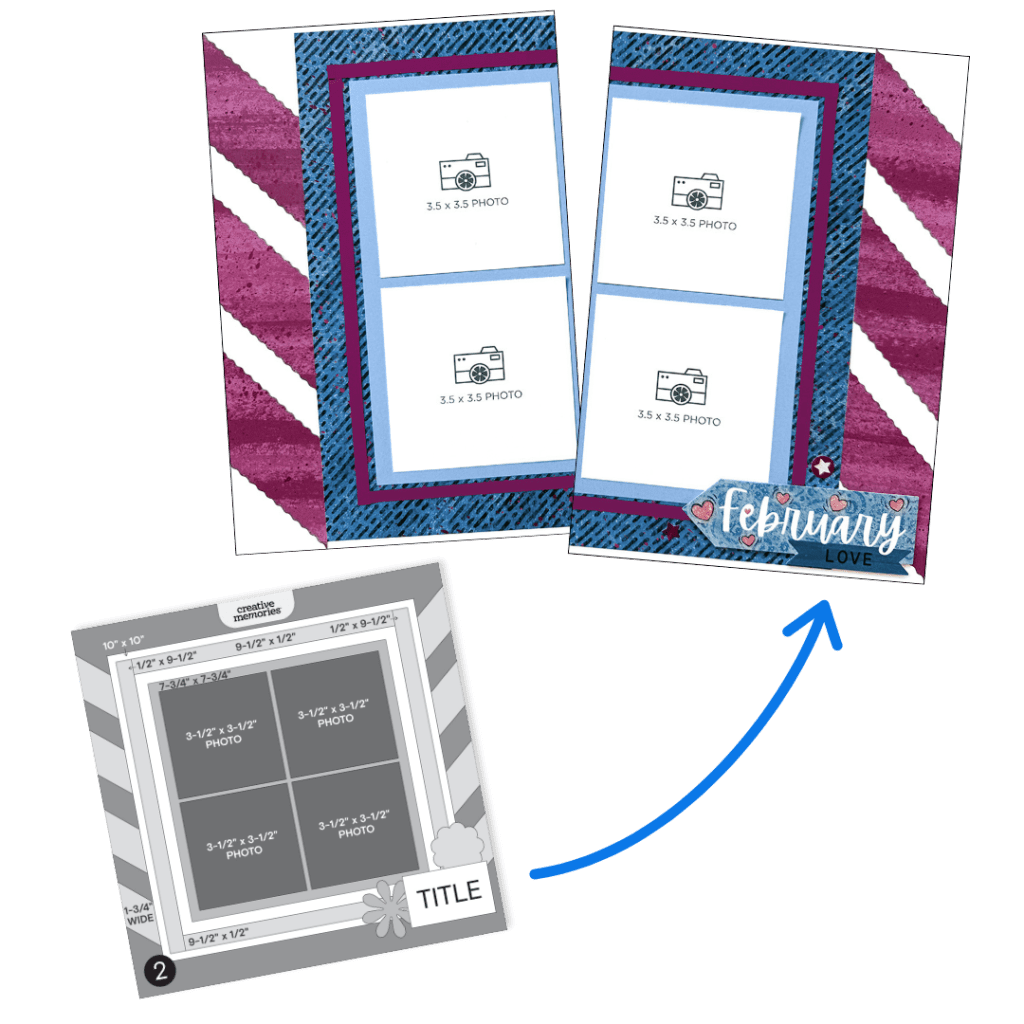
This version makes a few thoughtful adjustments while still staying true to the original sketch. Instead of limiting the decorative border to one page, extend it across both pages to create a more unified look. Keep the layering and photo placement similar, but scale everything down and remove the vertical column on the right side to better fit the narrower pages. There’s still room for multiple photos without the layout feeling crowded. For added contrast, consider matting the 4″ x 3″ photos with cardstock.
Because of the slimmer page width, swap out bulkier border tools for a decorative blade on the 12-inch Trimmer to create the edge details. The tags from the Your Own Way collection also work perfectly to enhance the design and reinforce the visual flow.
Photo sizes: One 3″ x 3″, one 3″ x 4″, three 4″ x 3″ and two 2″ x 2″
Sketch by Emily G., Creative Memories Design Team Contributor
Layout by Debbie P., Creative Memories Design Team Contributor

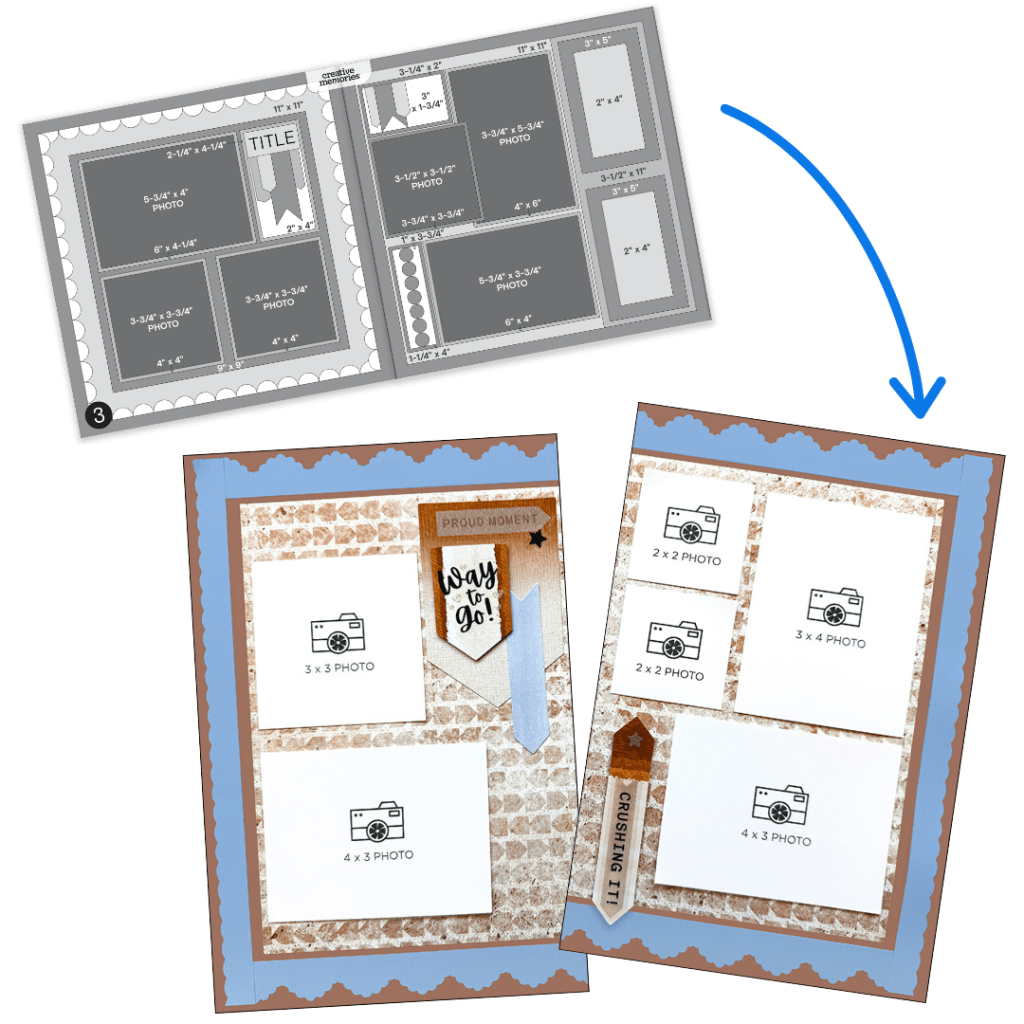
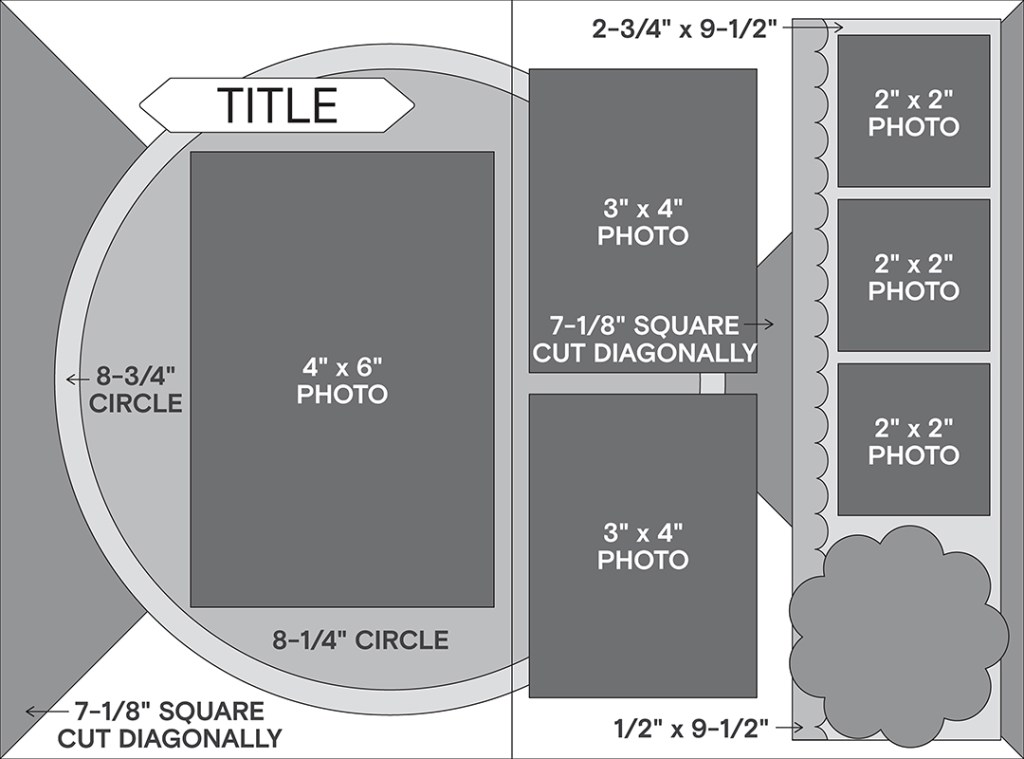
This transformation offers a great balance of structure and creativity — and it’s a design you’ll likely reach for again. The triangle elements along the outer edges provide strong visual anchors while still feeling subtle. Layer circle elements over the top to soften the design and create contrast between structured and organic shapes. This is also a great opportunity to incorporate a larger focal photo within the circle design to draw attention to a key moment. The rest of the layout supports that focal point while still allowing space for additional photos, a title and journaling.
Photo sizes: One 4″ x 6″, two 3″ x 4″ and three 2″ x 2″
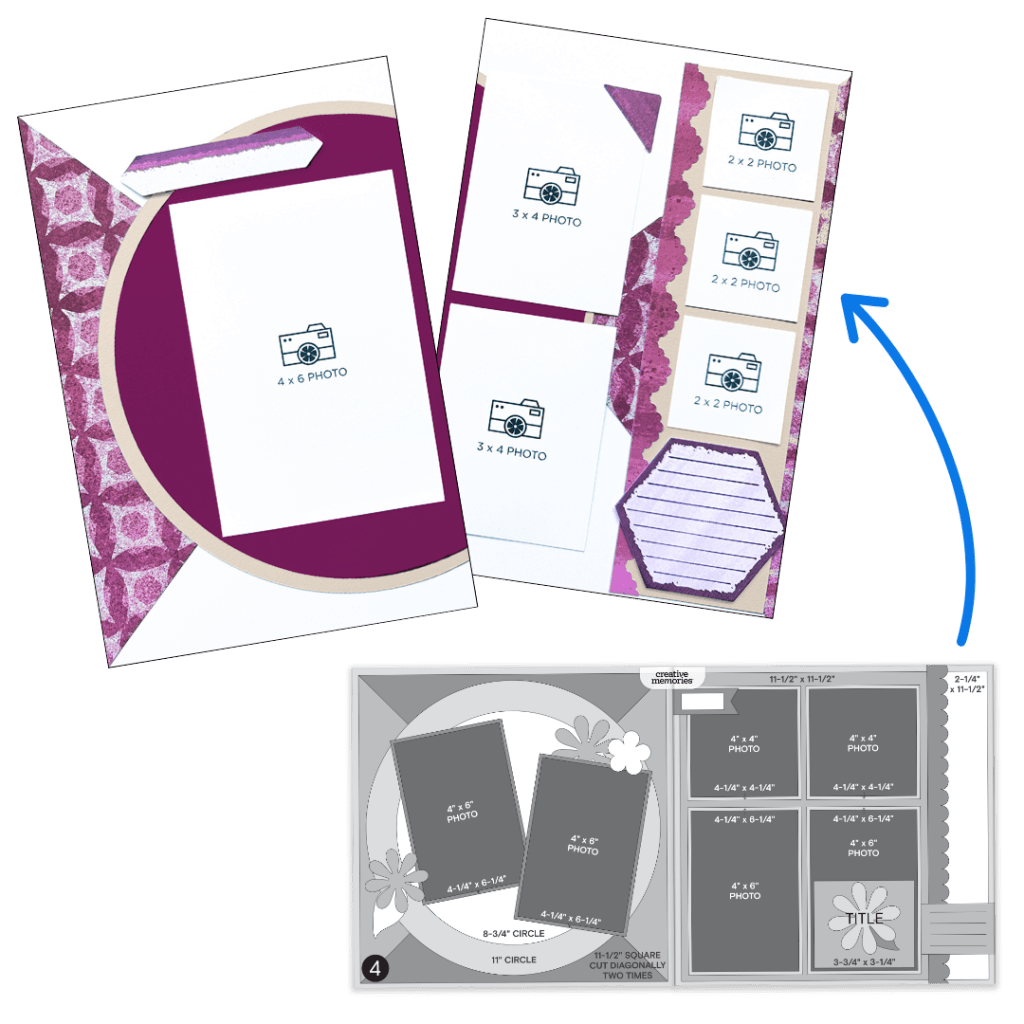
Sketch by Emily G., Creative Memories Design Team Contributor
Layout by Debbie P., Creative Memories Design Team Contributor
The Sketches
Sketch #1 — #CMVirtualCrop1January2026 #FullSize2FunSize
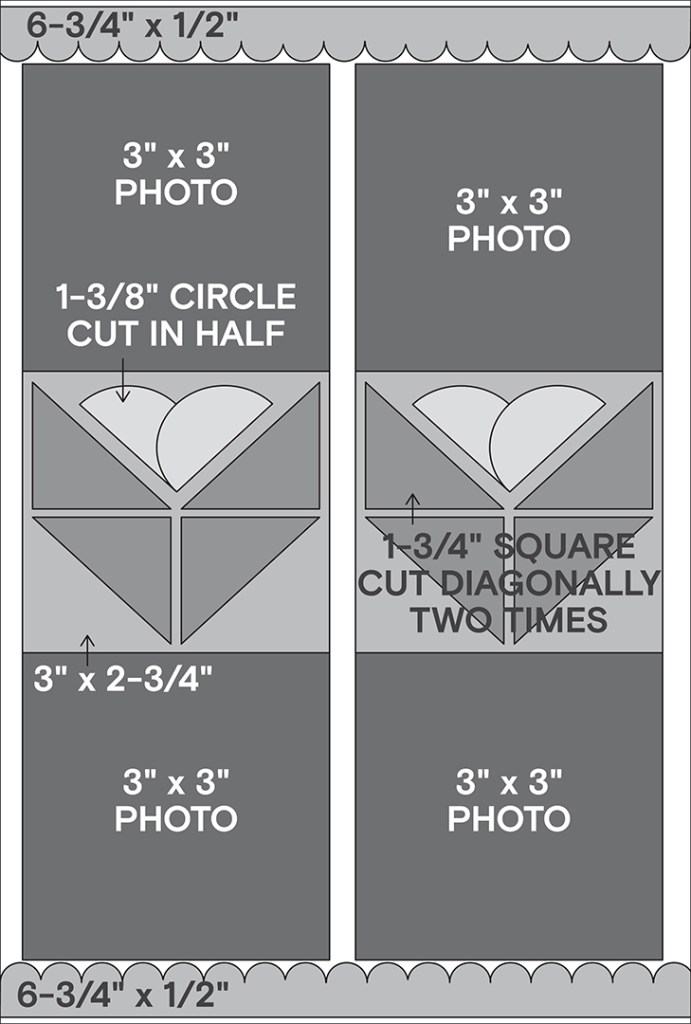
Sketch #2 — #CMVirtualCrop2January2026 #FullSize2FunSize
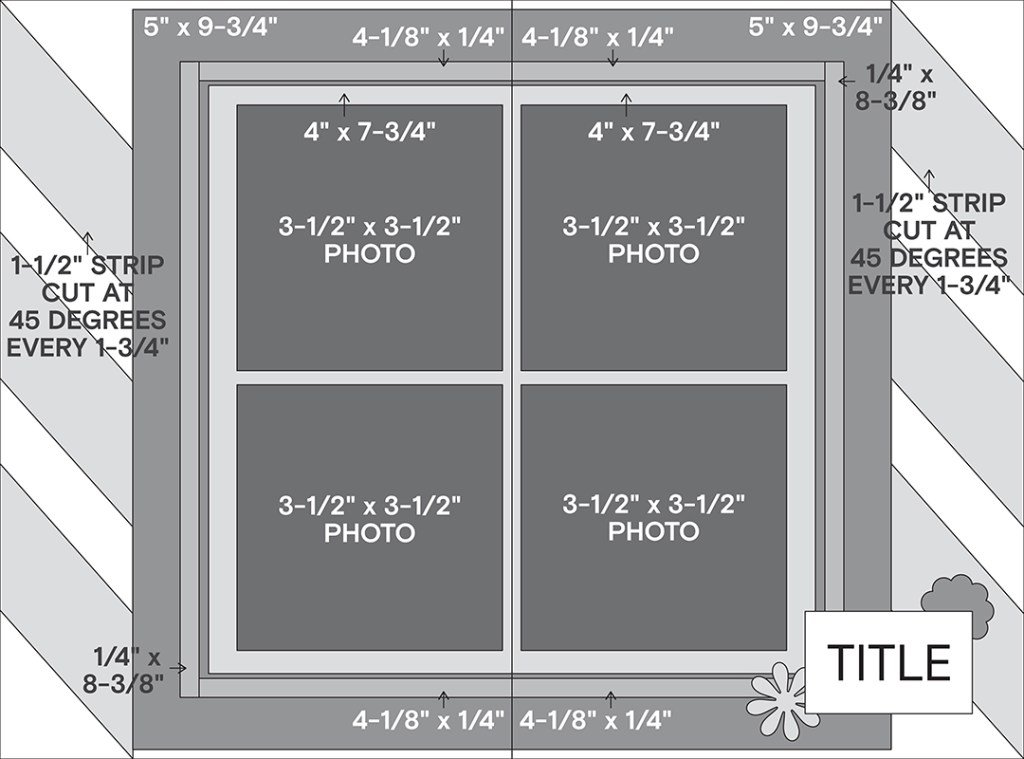
Sketch #3 — #CMVirtualCrop3January2026 #FullSize2FunSize
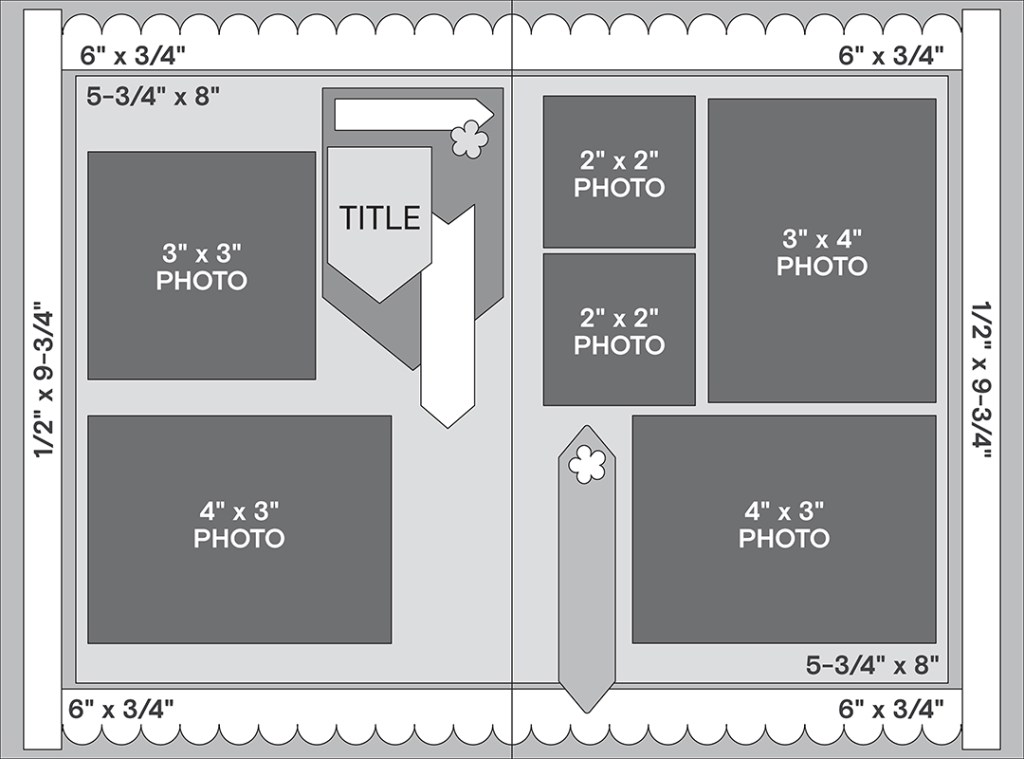
Sketch #4 — #CMVirtualCrop4January2026 #FullSize2FunSize
Things to Remember
When adapting 12″ x 12″ sketches to Scrap Journal pages, remember:
- Think smaller scale
- Simplify when needed
- Focus on preserving the structure, not every detail
- Edit thoughtfully rather than shrinking everything proportionally
- Less can absolutely be more!
Share your Scrap Journal recreations in the Virtual Crop Facebook group with the hashtags above. It’s always inspiring to see how each sketch takes on new life in a different format.


Thank you so much for these layouts and tips for the scrap journal. I love my scrap journals and so look forward to more and more ideas and F2F sets for them. Keep up the good work CM:):)
thank you for providing these!
I can hardly wait to create these. Thank you.
Thank you but the layouts don’t allow you to download the 4 sketches as one document.