January 11, 2024
Make Titles That Twist & Turn With The Titletopia And Mini ABC/123 Bundle
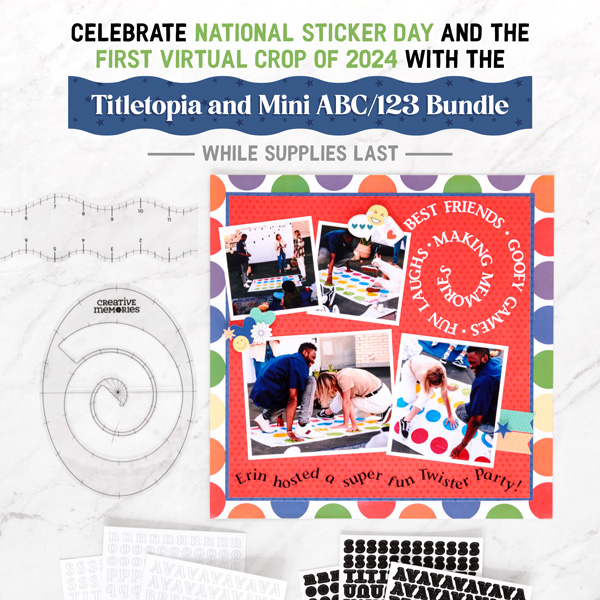
National Sticker Day is coming up this weekend, and because it overlaps the very FIRST Virtual Crop of 2024, we have a little something special planned: For a limited time while supplies last, you can purchase the Titletopia and Mini ABC/123 Bundle and create whimsical layout designs like the one below — check it out!

To create this layout you will need:
- Titletopia and Mini ABC/123 Bundle or (Shop Canada | Shop Australia) — Act fast to order your limited-time bundle while you can! It’s only around while supplies last!
- Whirls & Swirls Titletopia (2/pk)
- Black Classy Mini ABC/123 Letter Stickers (3/pk)
- White Classy Mini ABC/123 Letter Stickers (3/pk)
- This Life Paper Pack or (Shop Canada | Shop Australia)
- This Life Tone-on-Tone Paper Pack or (Shop Canada | Shop Australia)
- This Life Stickers or (Shop Canada | Shop Australia)
- White Solid Cardstock or (Shop Canada | Shop Australia)
- 12-inch Trimmer or (Shop Canada | Shop Australia)
- Multi-Purpose Tool or (Shop Canada | Shop Australia)
- Tape Runner or (Shop Canada | Shop Australia)
- Repositionable Tape Runner or (Shop Canada | Shop Australia)
- Foam Squares Variety Pack or (Shop Canada | Shop Australia)

Step 1: Cut blue dots tonal paper to 10-3/4? x 10-3/4? and adhere to the middle of a sheet of dots designer paper.
Step 2: Cut red dots tonal paper to 10-1/2? x 10-1/2? and adhere to the middle of the blue piece.
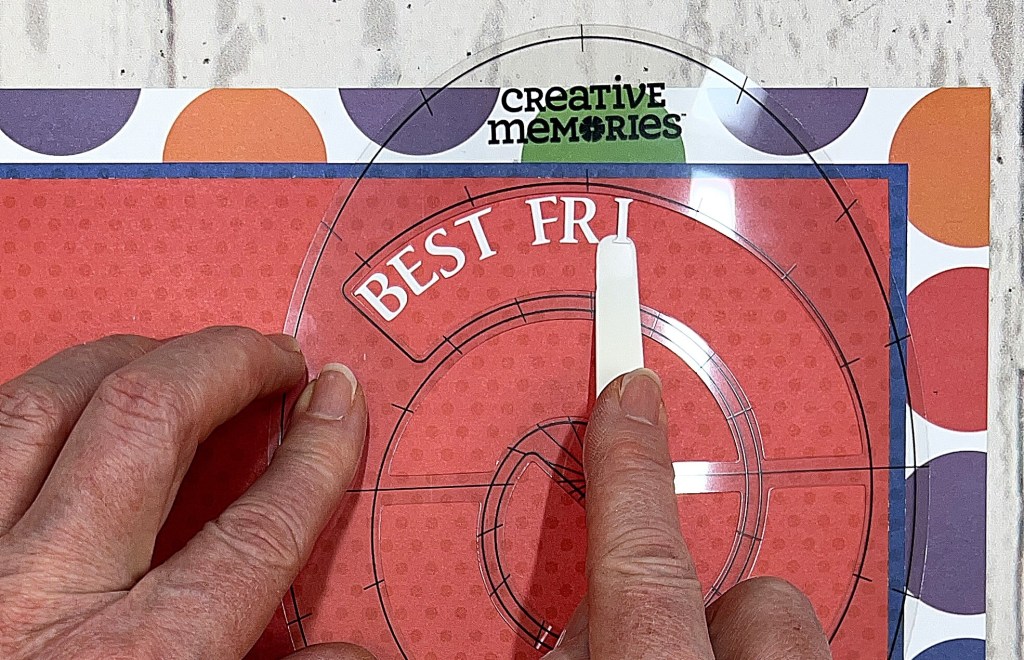
Step 3: Use the Swirls Titletopia to place White Classy Mini ABC/123 Letter Stickers into a title in the upper-right corner of the red piece. Use the Multi-Purpose Tool to help place letters.
Step 4: Crop photos to:
- Two (2) 3? x 3?
- 5? x 4?
- 3-1/2? x 4?
Step 5: From White Solid Cardstock cut the following mats:
- Two (2) 3-1/4? x 3-1/4?
- 5-1/4? x 4-1/4?
- 3-3/4? x 4-1/4?
Step 6: Adhere photos to mats. Adhere matted photos to the layout as shown.
Step 7: Use the Whirls Titletopia to place Black Classy Mini ABC/123 Letter Stickers (3/pk) into a journaling sentence at the bottom of the red paper as shown.
Step 8: Add sticker clusters with Foam Squares.
Although the Whirls & Swirls Titletopias’ main purpose is to help you create titles, headlines and captions, you can also use it as a stencil to draw or cut out swirls. How else do you see yourself using it?
P.S. Are YOU a member of the Virtual Crop Facebook Group? It’s your go-to place for MONTHLY Virtual Crops, MONTHLY Completed Album Challenges, WEEKLY LIVE STREAMING of Fast & Fun Projects with Noreen, LIVE QUARTERLY Secret Box Openings with project tutorials and so much more! We hope you’ll join our community of more than 37,000 fellow memory-keeping enthusiasts — you’ll feel right at home!

I really like the shape of this new titletopia.