October 30, 2026
Bloom & Grow: A Spring Layout with Die-Cuts & Embossing
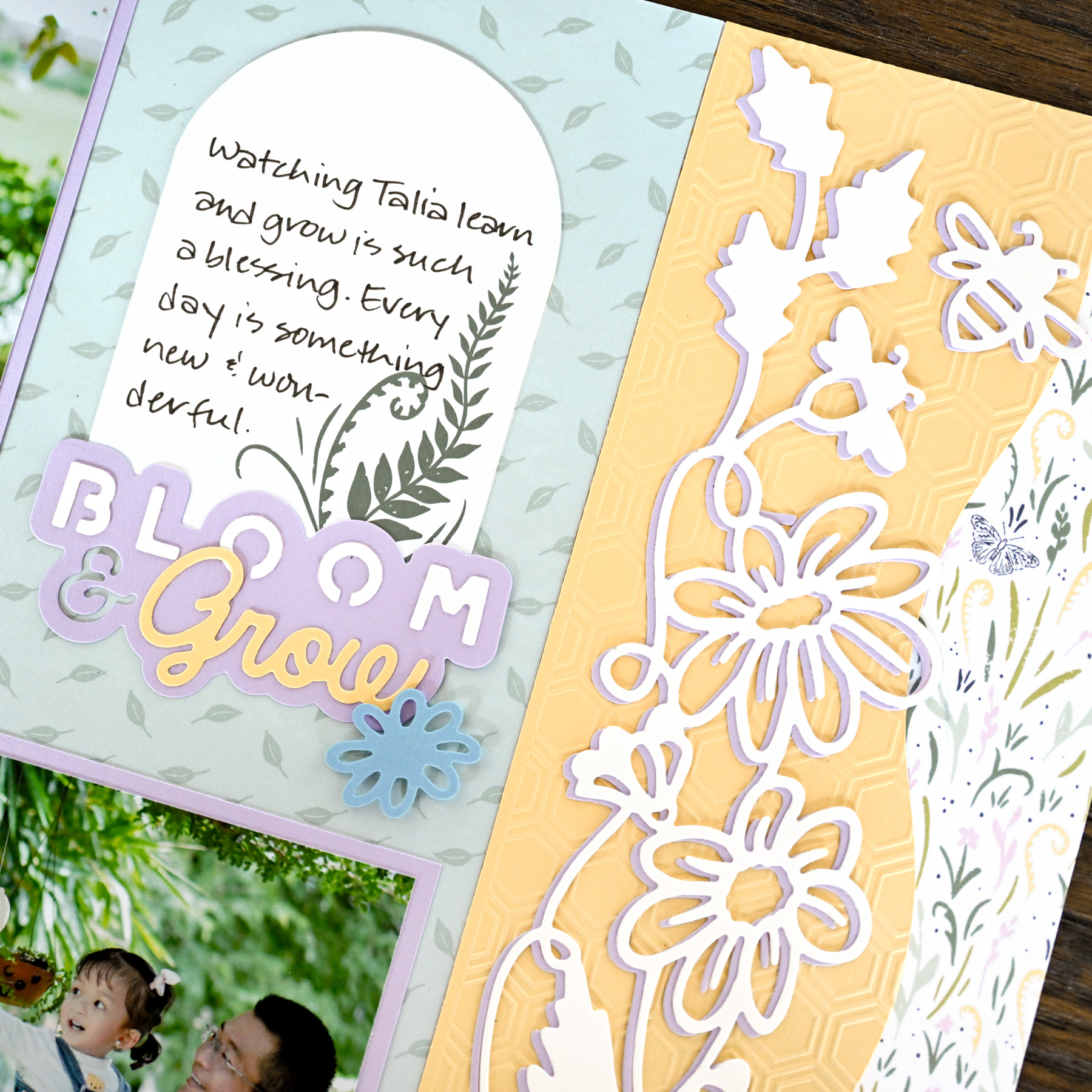
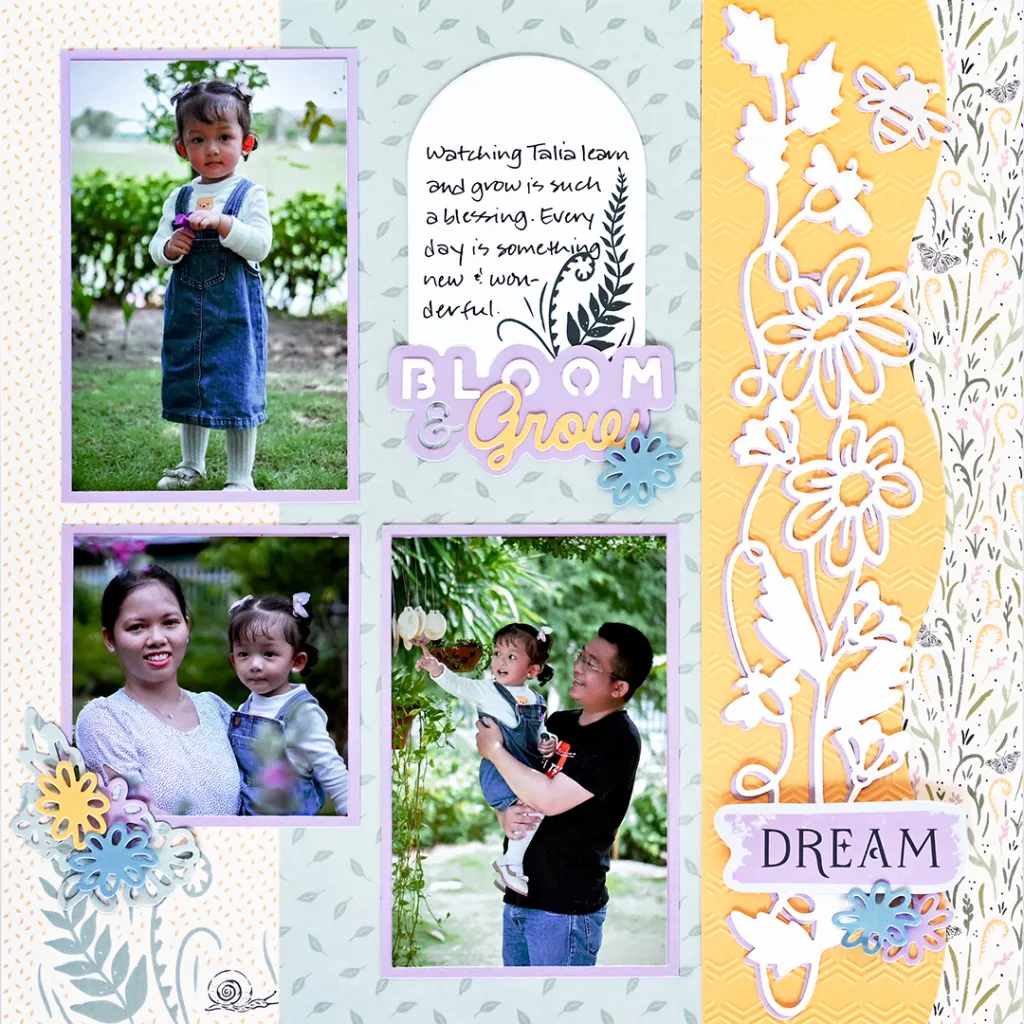
Spring is all about fresh starts and new growth, and this layout celebrates both! The Die-Cutting & Embossing Spring Decorative Bundle brings together the Bees & Blooms Border, the Honeycomb Hive Embossing Folder and the Bumble & Bloom Titles & Icons for a page that’s buzzing with dimension.
Paired with soft Spring Equinox papers and a curvy Custom Cutting System edge, this three-photo layout is a sweet way to capture the little ones who are growing up right before your eyes.
To create this layout, you will need:
- Spring Equinox Paper Pack
- Spring Equinox Fast2Fab™-Inspired Paper Pack
- Spring Equinox Embellishments
- White Solid Cardstock
- Canary Solid Cardstock
- Purple Ice Solid Cardstock
- Cornflower Solid Cardstock
- Die-Cutting & Embossing Machine
- Die-Cutting Titles & Icons – Bumble & Bloom
- Die-Cutting Border – Bees & Blooms
- Embossing Folder – Honeycomb Hive
- Dual-Tip Die-Cutting Tool
- 13×13 Cutting Mat
- Custom Cutting System Border Cutting Tools – Zig Zag, Peak, Curves & Ripple
- Red Custom Cutting System Blade Cartridge
- 12-inch Trimmer
- Photo Trimmer
- Place & Peel Tape
- Tape Runner
- Repositionable Tape Runner
- Foam Squares
- Black Dual-Tip Pen

Love this layout?

Love this layout?

Step 1: Use a sheet of Spring Equinox Fast2Fab™-Inspired paper with a light floral pattern on the right edge as the base for this layout.
Step 2: Using the curves edge of the Custom Cutting System Border Cutting Tools and the Red Custom Cutting System Blade Cartridge, cut a 2-7/8″ x 12″ strip from Canary Solid Cardstock.
Step 3: Place the Canary strip inside the Honeycomb Hive Embossing Folder, sandwich it between the Embossing Base Plate and the Universal Top Plate and run it through the Die-Cutting & Embossing Machine. Adhere the strip so the curves edge is 1″ from the right edge of the base.
Step 4: Cut a 3″ x 12″ strip from both White Solid Cardstock and Purple Ice Solid Cardstock. Place one strip on the Cutting Base Plate, lay the Bees & Blooms Die-Cutting Border ridge-side down on the strip and place the Universal Top Plate on top.
Step 5: Run it through the Die-Cutting & Embossing Machine, then use the Dual-Tip Die-Cutting Tool to remove the piece from the die. Repeat with the second strip.
Step 6: Layer the white border over the Purple Ice border so just a little of the Purple Ice shows. Adhere the pieces on the honeycomb strip using the Repositionable Tape Runner.
Step 7: Cut a 5″ x 12″ strip from green leaves designer paper and adhere it next to the Canary strip. Cut two 3-1/2″ x 5-1/4″ mats and one 3-1/2″ x 3-1/2″ mat from Purple Ice Solid Cardstock.
Step 8: Crop two photos to 3-1/4″ x 5″ and one photo to 3-1/4″ x 3-1/4″ and mount them on the mats. Adhere the matted photos on the layout as shown, along with a journaling embellishment.
Step 9: Using the Bumble & Bloom Titles & Icons, die-cut titles and flowers from cardstock and designer paper scraps. Adhere them on the layout as desired, popping some up with Foam Squares for dimension.
Step 10: Journal as desired with the Black Dual-Tip Pen.

Want to recreate this layout?
We’ve gathered all the products featured in this project in one place, making it easy to find the papers, embellishments, tools and more.
P.S. Are YOU a member of the Virtual Crop Group? It’s your go-to place for MONTHLY Virtual Crops, MONTHLY Completed Album Challenges, QUARTERLY Secret Box Openings with project tutorials and so much more! We hope you’ll join our community of more than 53,000 fellow memory-keeping enthusiasts — you’ll feel right at home!

